Important Notice: Fake CAPTCHA Scam

Website Notice: Fake CAPTCHA Scam (March 11, 2026)

For a short period yesterday (March 11, 2026), our website was affected by a fake CAPTCHA scam. If you visited the site during that time, you might have seen an “I’m not a robot” verification box. Please read this notice carefully—especially if you followed any instructions appearing after that CAPTCHA—and follow the link at the end for detailed info and guidance.

What happened

A fraudulent CAPTCHA was displayed to visitors and was designed to look legitimate but included additional steps that no real CAPTCHA would ever require. Note: Our site does not normally require CAPTCHA for visitors.

A genuine CAPTCHA will only ask you to:

  • Check a box, or
  • Complete a quick image or puzzle challenge.

A fake CAPTCHA, on the other hand, might instruct you to:

  • Download or run a file, or
  • Copy and paste a command into your Windows dialog box or Mac terminal.

These actions are never part of real verification steps. They are used by scammers to install malware or gain access to personal information.

What to do if you followed the instructions

  1. Disconnect your device from the internet (unplug Ethernet or turn off Wi‑Fi).
  2. Avoid logging in to sensitive accounts until your device has been checked or cleaned.
  3. Run a full antivirus/anti‑malware scan using an updated tool such as Windows Security or Malwarebytes.
  4. If anything suspicious is found, consider professional cleanup or a full system reinstall.
  5. From a separate, trusted device, change passwords for important accounts—email, banking, and social platforms in particular.
  6. Monitor your financial accounts for unusual activity. If you believe your financial data was exposed, consider placing a credit freeze or fraud alert.

For more details about fake CAPTCHA scams and how to avoid them in the future, visit:
👉 https://www.malwarebytes.com/cybersecurity/basics/fake-captcha-scams


We apologize for any inconvenience this may have caused anyone. Hopefully everyone noticed something wasn’t right and did not run any commands in their windows dialog or terminal.

Giving

Pastor Charlie sincerely wishes to personally acknowledge each contribution when possible. Should you prefer anonymity, we will honor your choice. However, if you are comfortable with it, Pastor Charlie would appreciate it if you could email the church, allowing him the opportunity to express his gratitude directly.

You can donate to the church with the below options:

(Non tax-deductible):

  • By Mail: You can mail your donation directly to the church at the address below.
    The Superior Word
    6512 Superior Ave
    Sarasota, FL 34231
  • PayPal: Please email the church for info on sending your donation using this option. SuperiorWord@gmail.com
  • Zelle: You can use the email address above to send your donation. 

(Tax-deductible)

  • Helping Hands Ministries  (CLICK HERE). Note: Due to IRS regulations, we are unable to identify donors who choose this option.


In Loving Memory of “Cousin Mike”

It is with heavy hearts that we announce the passing of Brian Michael Sullivan, affectionately known to us as “Mike the Webguy,” and “Cousin Mike,” on February 18, 2025.

Brian was a profoundly talented web designer and administrator who single-handedly envisioned, developed, and maintained The Superior Word website, establishing a vital online presence that became the foundation for our church’s worldwide growth—a reach that would not have been possible without his original vision and dedication, later enhanced by others. His skill and unwavering commitment brought Pastor Charlie’s extensive library of writings and sermons to countless people, creating a lasting digital home for a ministry that continues to touch lives globally. Brian will be deeply missed, but his remarkable contributions endure, serving all who have and will benefit from his work. We take comfort knowing he is now at rest in the Lord, and we extend our heartfelt gratitude to “Cousin Mike” for everything he did for The Superior Word church community.

His obituary can be viewed HERE. We warmly invite those who knew ‘Cousin Mike’ or wish to honor his invaluable contributions to our Superior Word church family to share a memory or note of appreciation on his obituary page. Your words may offer comfort to his family, reflecting the profound impact he had on the growth and sustainability of The Superior Word church.

Until we meet again, ‘Cousin Mike’… Thank you for all you did for us!


You can watch Pastor Charlie’s comments about what Mike meant to our church during the opening of Bible Study class on 3/20/25, HERE, as well as his opening comments from our Sunday Service on 3/23/25, HERE.

Sermon Audio Apps/News

Sermon Audio (SA) offers a few different mobile apps you can use to access The Superior Word content on the go. We suggest the following two.

Sermon Audio 3.1 (new): The official app of SermonAudio. This latest version has been completely reengineered under the hood to deliver superior media playback stability while setting a bold strategic direction for future development. Available on iOS and Android.

ChurchOne by Sermon Audio is an app that does not require a user account. With this app you choose a single broadcaster to follow. Once selected (by search or church code), this app will only have access to video/audio content of the broadcaster you selected (you can choose to follow a different broadcaster if you wish). With the latest update, you can now access PDF notes. If you allow notifications (the app will ask on setup), anytime new content is published you will receive a notification on your device. This could be good or bad depending on where you live. We do our best to upload content at reasonable times (in the United States), however, there are times when we may not.

Both apps allow you to stream and/or download any video/audio to your device. You also have the ability to “resume” playing the last unfinished sermon you may have stopped for whatever reason.

You can follow our church by searching for “The Superior Word” or insert our church code: 48686.

To stay updated on Sermon Audio’s content offerings, please follow their News releases. You can find their news releases HERE.

Podcast Platforms

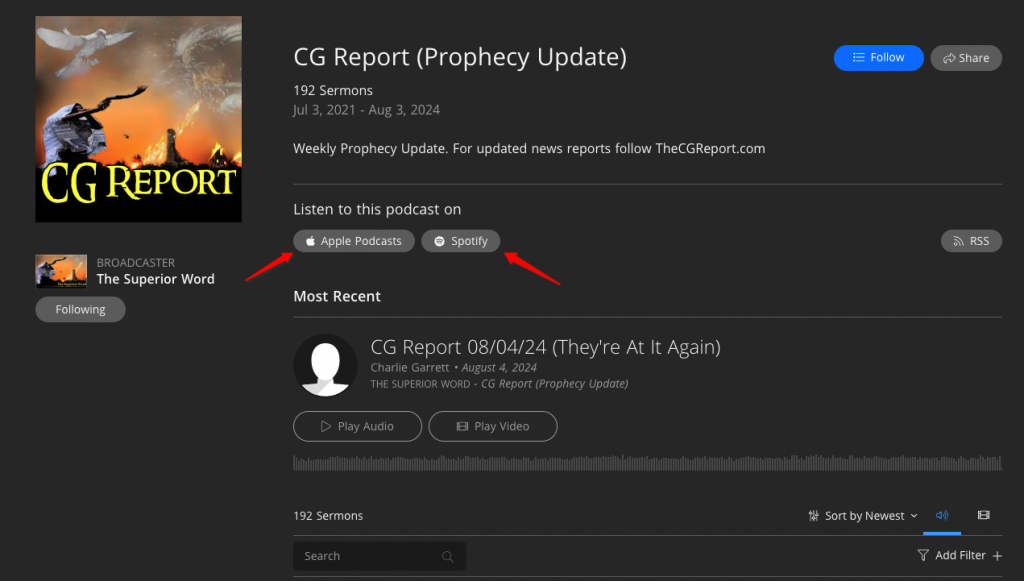
Our Podcasts can be found on Apple Podcasts as well as Spotify.

For iOS/Mac users, you can use THIS LINK to open “The Superior Word Channel” in the Apple Podcast application. From there you can browse the different series and “follow” (subscribe) to each if you wish. Once you “follow” that series it will become part of your podcast library.

For Windows users, we suggest using Spotify. From within the Spotify app/webpage, utilize the “Search” function and search for “Charlie Garrett.” You will see various content listed in the results. Look for the “Podcast” option and click on it. From there it will be easy to each podcast series. You can subscribe as you wish.

Alternatively, you can go to the ‘series’ section on Sermon Audio [HERE], select a series, and you will find links to Apple and Spotify within. See below for an example.